Real-time data analysis that anticipates your questions and transforms KPIs into strategic insights.
Welcome to #TechStation, SDG Group's hub dedicated to the latest innovations in data and analytics! In this article, we explore Tableau Pulse, an innovative Salesforce solution that revolutionizes how companies interact with their data. Designed for proactive KPI monitoring via artificial intelligence, Pulse brings analysis directly into your daily workflow with smart notifications and personalized insights. Discover how this tool can help you never fall behind your data again.
Looking for something else? Check all of our content here.

How many times have you realized a drop in sales only when it was already too late?
In a market evolving so quickly, delayed access to critical information is no longer tolerable.
With the sheer volume of data growing exponentially, companies now rely on tools that not only turn information into actionable insights but also analyze it as events unfold.
That’s why Tableau Pulse was developed: an innovative solution by Salesforce available on Tableau Cloud, designed to keep you ahead of the data in real time.
What is Tableau Pulse?
Pulse is an innovative, interactive and dynamic tool, useful for monitoring the most important KPIs and business metrics in real time, offering personalized insights through integration with artificial intelligence.
This tool is also capable of adapting in real time to user needs, speeding up data analysis without compromising quality or consistency with the data and the business context.
One of the features that distinguishes Pulse is its ability to anticipate anomalies and trends, using machine learning algorithms and advanced analysis, thus giving users the opportunity to anticipate the emergence of problems through personalized notifications and smart and proactive suggestions.
The new Tableau tool takes the concept of data analysis to a higher level and increasingly in step with modern times, revolutionizing the way we act on data and bringing analysis directly into our daily flow.
Furthermore, the native integration with Tableau Cloud allows users to access insights from anywhere and at any time, eliminating the need for sophisticated hardware infrastructures.
Main features of Tableau Pulse
1. Proactive Analysis
The Pulse algorithm is not limited to passive data monitoring. Its AI analyzes data in the background, identifying trends that could escape manual analysis.
2. Smart Notifications
You can receive personalized notifications via email or Slack, with the ability to choose the frequency (daily, weekly or monthly). These notifications do not simply report a change, but also include the context necessary to understand what caused the change, also suggesting potential corrective actions. This approach allows users to act in a timely and informed manner.
3. Tailored customization
Pulse has been designed to adapt to the needs of each user. The platform allows you to set custom thresholds for KPIs, create new calculation fields, decide which notifications to receive or follow and share metrics with other users. In addition, integration with artificial intelligence allows you to ask questions about key metrics and filters, through a dedicated question bar for this feature.
4. Native integration with Tableau Cloud
Pulse is natively integrated with Tableau Cloud. For this reason, it enjoys all the advantages of cloud computing such as security, scalability and global access. This integration makes it possible to use dashboards continuously and updated, making data analysis even more accessible.
As part of Tableau Cloud, Pulse enjoys all the benefits of cloud computing: security, scalability and global access, making data analysis always available, up to date, and accessible.
A New Tool for Data Control
Pulse also represents an innovative opportunity for analysts, as it allows for deeper and more proactive control over data.
The automation of monitoring of most metrics allows teams to reduce the time spent on many manual checks and focus on more sophisticated strategic analyses.
Furthermore, thanks to its structure, Pulse makes the collaborative aspect easier, as it allows notifications to be easily shared and this allows them to be discussed within company platforms.
Use Case — Tableau Pulse: Real-Time Alerts to Monitor Sales Trends
Let’s suppose we are at the beginning of the month and we want to monitor sales trends in real time, without having to open dashboards, export Excel files or ask IT for an update every time.
Until recently, this meant manually checking dozens of numbers every day. But thanks to the introduction of Pulse, the logic has been reversed: today we are no longer chasing the data, but the data finds us, warns us and explains what is happening.
From the image below you can see how Pulse has been set up with a very simple definition: monitor MTD (Month to Date) sales, comparing them with the previous period (e.g. 1–20 April vs. 1–20 May) and the same period of the previous year.
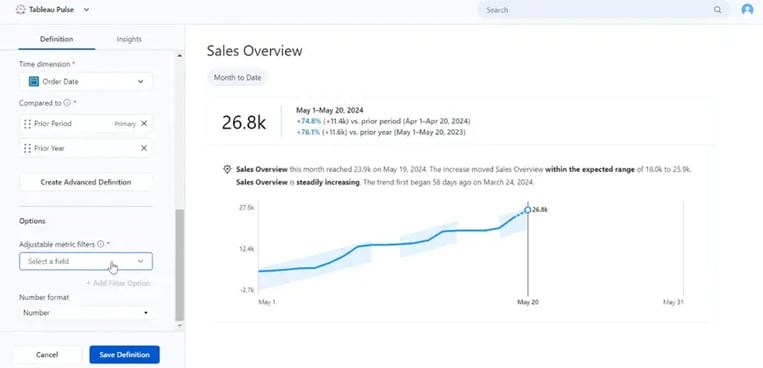
Just select the “Order Date” field as the time dimension, choose the two comparisons, and Pulse starts working autonomously.
As you can see from the image, on May 20, without having to lift a finger, Pulse notified us:
“Month to date sales have ranges unto 26.8k, with an increase of +74.8% compared to the previous month and +76.1% compared to the same period last year.”
But Pulse didn’t just give us this information.
It also showed us that the value was outside the expected threshold, that the positive trend had started 58 days earlier, and that the peak data (23.9k) had been recorded the day before. An analysis like this, done by hand, would have taken at least 15–20 minutes, and would not have arrived in time.
Other relevant Features of Pulse:
1. Ability to ask questions about metrics
Thanks to the AI integrated into Pulse, it is possible to ask questions in natural language in the Pulse bar so that you can receive smart information about the desired metrics.
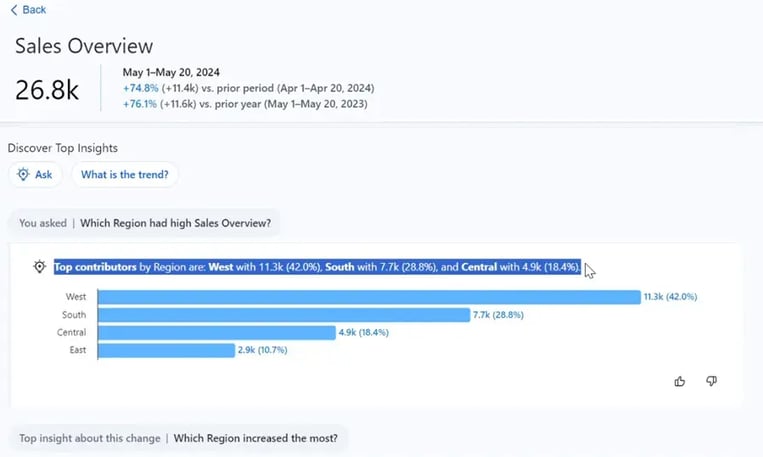
In this case the question asked was “Which region had the highest sales?”
The answer came in a few seconds: sales were driven by a peak in the West region. This is, in fact, a real conversation with the data.
2. Ability to follow and share metrics
Each team member can follow the metrics they consider most relevant, receiving updates only on those, as if they were “favorites”. And not only that: it is possible to share them with other colleagues directly from Pulse.
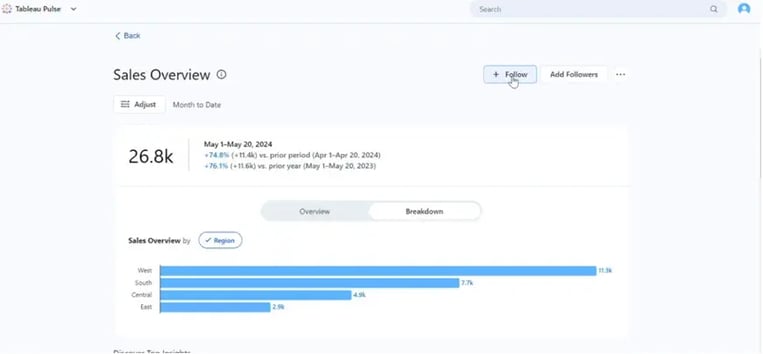
3. Customizable notifications
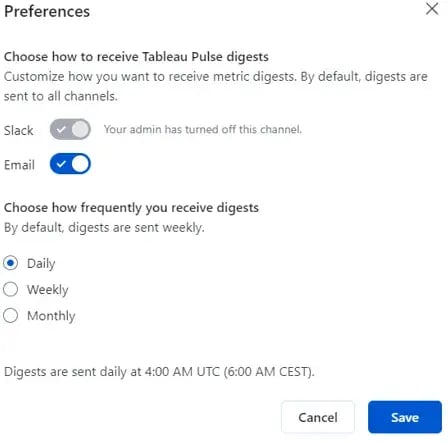
Thanks to Pulse, it is also possible to choose how, when and on which channels to receive notifications. Some colleagues prefer to receive them via email in the morning, others directly on Teams in the chat flow. For example, you could set Pulse to be notified only if a metric varies by more than 10% compared to the previous month. No noise, only signals that matter.
The following image represents the possibility for the user to select notification preferences.
The outcome?
• Real-time decisions → Decisions are made quicker.
• Shorter meetings → Answers are already in notifications.
• Accessibility for all users → Even those who don’t use Tableau every day can now easily and directly communicate with data.
Conclusions
It’s not just about monitoring: Tableau Pulse changes the relationship between people and data.
This tool allows us to anticipate, understand and collaborate better, all without ever leaving our workflow.
So it’s no longer about observing the data, but about “listening” to it.
Are you ready to let your KPIs speak?
Do you want to take your Business Intelligence strategy to the next level? Contact us for a personalized consultation and discover how Tableau Pulse and SDG Group's solutions can transform the way your company interacts with data, ensuring faster, smarter, and more proactive decisions.

